

Calculation helpers
Calculations are helpers that determine a value of a field, based on the value of other fields. Calculations are like formulas in a spreadsheet.
How to use a calculation helper
A calculation is always defined as a property of the field which value has to be calculated. As a result of this, the field will automatically become a read-only field. If the result of the calculations should always be defined at run time in the application, no database column name should be entered for the field. If the result of the calculation should be stored in a persistent manner however, the field must have a database column.
You can set the calculation at the tab Properties. Select a calculation helper and it will be possible to edit it's parameters. In this screen, source fields can also be set. Whenever these fields' contents are changed in the application, the calculated field will be automatically recalculated.
Example: Field concatenation
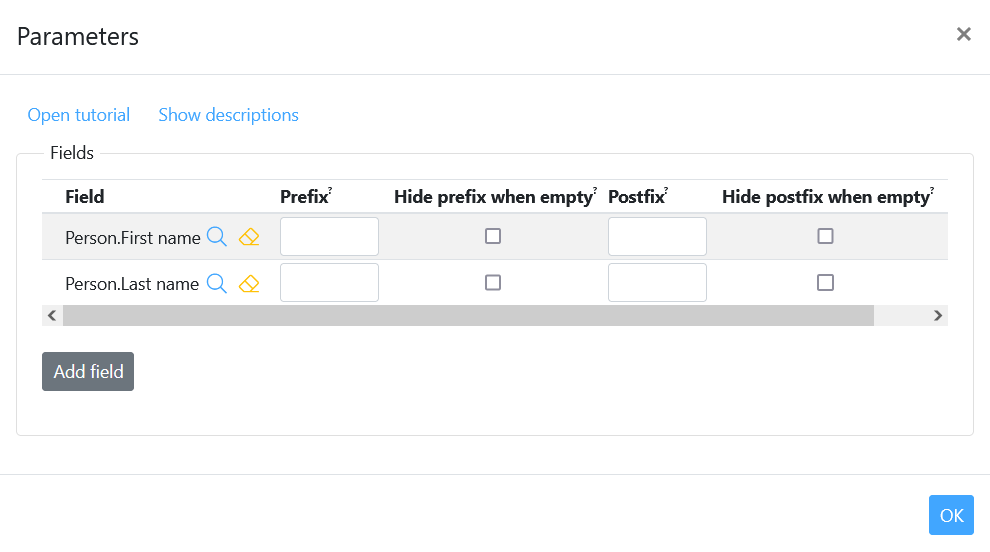
Suppose, we want a field full name for a person. The full name will be a combination of the first name and last name fields.
- Create a new field "full name"
- Go to the tab Properties in the field details of this new field
- Select the type Field concatenation as calculation type in the "helper" section.
- Click "Edit parameters".
- Add fields by clicking the "add fields" button, followed by the "select field route" button.
- Put a space in the "prefix" field of the last name.
- Click "ok" and save.
This will create a new field for your class containing the full name for a person.
Available calculation helpers
The following calculation types are available:
-
Account info
This calculation provides information about the status of the account. This calculation can only be defined for fields on a user class. A user class is a class that contains data about users of the application. The property 'Email field for account' should always be set.
-
Confirmation status
This calculation provides information about the status of the confirmation process. The status can have three values: 'pending' (awaiting confirmation), 'partially confirmed' and 'confirmed'. For this calculation to be usefull, you will need to allow the use of confirmation services in your application and implement the confirmation action helper as well.
-
Email from account
This calculation provides the validated email address from the account. This calculation can only be used for fields that belong to a user class.
-
Expression
Calculates the value of a field using an expression.
An expression is any combination of operators, constants, functions and names of fields that evaluates to a single value. -
Field concatenation
This calculation helper can be used to concatenate the values of different fields. Each field can have its own prefix and postfix.
-
First value getter
This calculation retrieves the value from another field. More than one field may be specified. The value getter will return the first value that is not null.
-
JAVA plugin helper
A calculation implemented in a JAVA class file. This option is not available yet for external developers. CrossmarX can program the calculations in the mean time. If you want to develop the calculation your self, please use Velocity.
-
Script
This calculation helper type allows you to define the calculation of a field using a script.
-
Value from neighbour
With this calculation one can retrieve the value or values of a field from one or more related records and use these in an aggregate function. The function sum can be used to add up the values, if the values 3,8 and 4 are retrieved this function will return 15. The function count calculates the number of values what will return 3.
For example the class Person has a relation with the connected class order. The class order has the field Total gross amount and now we can use the values of this field in the class Person . Sum will add up the Total gross amount values and count will calculate the number of Total gross amount values.
-
Velocity
Allows you to write your own calculation in velocity.